

Purchasing Power
March 5, 2009 by ZZadmin123
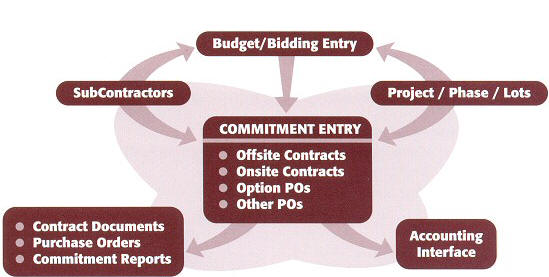
 Purchasing Power provides your purchasing department with all the tools they need to fully automate the contracting process. From entering budgets and bids to generating payment schedules this module will assist you with contract preparation and the printing of all the necessary reports and documents. Since it links with the other IBSWIN modules, it shares the common subcontractor, project, phase, and lot information. It provides a simple electronic interface to your accounting software to export your commitments and eliminate redundant data entry. Give your purchasing department the power!
Subcontractor Information
Provides master database with all pertinent information on each of the subcontractors and suppliers that you order from. It includes the ability to enter and track license and insurance information and automatically gives you expiration warnings when creating new contracts
Budgets Made Easy
Just like your current Excel spreadsheets you can easily enter your on and offsite budgets and even track any revisions. Compare your budgets to bids and to contracts already issued to determine your variances. For off-sites IBSWIN will even create a bid request sheet which can be used to solicit bidding on actual items that have been budgeted.
Bid Entry and Awarding
Enter and revise bids and easily compare them to your budgets to help you determine who to award your contracts to. Awarding a bid is a simple "click of a button" that will transfer the bid information automatically help create your contract documents.
Off-site Contracts & Change Orders
Simple entry of each line pertaining to your offsite contracts and change orders or select them from a predefined list. Generate payschedules, addendums, and/or exhibits. Provides a simple one-screen history of all the contracts and change orders issued to each sub.
Automated On-site Contracts
By entering the bid costs per plan for a specific subcontractor the system will automatically "spread" the cost to each lot and pay point. Saves time and errors. Print pay schedules breaking down your costs by lot and pay point and other contract documents.
Generate, Print, and Edit Option Purchase Orders
Simple interface to Options Plus allows purchasing to view the option orders and generate necessary purchasing reports.
Create and Print other Purchase Orders
Provides you with a simple tool for generating purchase orders and back charges.
Automatic Contract Merge with Microsoft Word
Allows you to easily print boiler plate documents and scopes of work prepared in Microsoft Word.
Available Commitment Reports
- Contracts, change orders, and purchase orders summarized by project/phase.
- Purchase order detail by lot.
- Commitment detail by subcontractor.
Automated Data Interface to Construction Accounting
Currently IBSWIN has interfaces with Sage Timberline, Master Builder, and other accounting systems.
Sample Reports
- Contract
- Budget Contract Comparison Report
- Subcontractor Agreement
- Contracts Summary Report
- Purchase Order Summary Report
- Direct Construction Budget
- Direct Construction Budget vs. Actual
Options Plus
March 4, 2009 by ZZadmin123
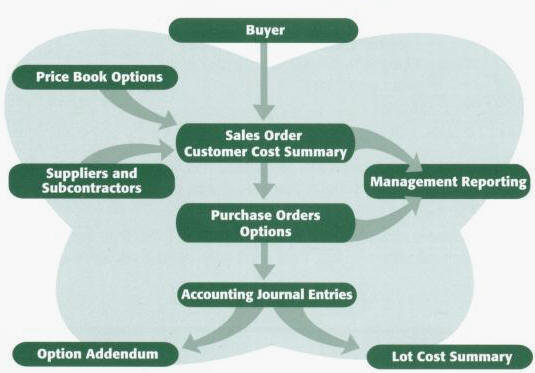
Options Plus assists your salespeople from the moment they sit down with the homebuyer on the initial discussion through the final selection of Options. This system completely automates the intensive and time consuming paper process from start to finish by generating accurate options orders. It even automatically generate purchase orders to your subcontractors, provides your superintendents with immediate updates, and keeps everyone on the same page. The database is comprised of pricing, suppliers, subcontractors, cut-offs, and other vital data which is used to generate orders.
Automated ordering
Auto-generation eliminates Purchase Order typing, and the loss of revenue due to outdated or incorrect pricing or mistakes in calculating.
Plans
Allows for “Plan Specific” option pricing so that your salesperson only gets a listing of options specific for each buyer’s plan.
Price Book
All current option prices are maintained on the database. Improving pricing accuracy. Provides professionally printed Price Book.
Prices
Auto mark-up feature makes price changes easy and speeds up initial cost and price set up.
Purchase Orders
Automatic generation of Purchase Orders with a push of a button.
Sales Orders
System produces a hard copy Sales Order for customer to sign. This can be tailored to each builder’s requirement.
Management Reports
- Lot Profit Analysis Summary Report
- Ordered Option Recap by phase
- Options Purchased by Subcontractor
- and many more…
Options Plus greatly increases your staff’s productivity and output capacity. Orders, whether they are customer option orders or supplier purchase orders, are generated in minutes not hours.
The Options Plus system allows your salespeople to spend more time with the home buyers and less time with their calculators – in fact, they won’t even need a calculator anymore.
Sample Reports
- Options Order
- Superintendent Report
- Options Purchase Order
- Options Profit Analysis
- Sales Manual
- Option List Detail Report
- Ordered Options Recap Report
Sales Manager Plus
March 3, 2009 by ZZadmin123
 Sales Manager Plus provides the sales and marketing department with the tools to track prospects from the time they visit your models to the time they happily move in. It automates the buyer qualifying process and provides professional looking print-outs and the ability to track every key date in the escrow cycle. It is designed to run in your sales offices and fully automates sales processing and tracking.

Real-time Communication of Sales Information
Using Microsoft Terminal Services© or Citrix© your sales offices can link through the Internet directly to you corporate database so that sales related information is updated in real-time.
Automated Letter Preparation and Follow-up
Letters and mailings to prospects and / or buyers are tracked and created automatically via a simple mail merge with Microsoft Word. Create as many letters and documents as you need and schedule regular letters for automated processing. You can also print mailing labels with a simple click of a button. In a similar way phone calls can be logged and scheduled so that you never forget to do the necessary follow-up with your homebuyers and prospects.
Mortgage Plan Alternatives
Pre-qualifying a prospect can be done as easily as selecting the right loans from a list of alternatives as setup in IBSWIN. Each loan can be setup with its own rates, terms, and other details as per the loans requirements and restrictions. This includes the ability to setup loan types such as (but not limited to) VA, FHA, Piggyback, and Interest Only.
Pre-qualifying Reports
Track valuable information about the quality of each prospect by providing amortization schedules and mortgage worksheets for the different programs you offer and show the affordability.
Traffic Tracking & Demographic Analysis
Using a simple traffic screen you are able to enter the traffic information by day and traffic source for each of your communities. Analyze the demographics of your prospects and even buyers by setting up your questionnaires and inputting the responses to generate a comparison of the responses given.
Options Sales Automation
Pre-select options and upgrades for your prospect or buyers from within the sales module. Options can be selected by option category and with the appropriate security options past cutoff cannot be ordered. Enter deposits or payment and print buyer options agreements ready to submit to your purchasing department. As an additional option, Webview uploads the options available in IBSWIN to the internet to allow buyers to pre-select options from home using full color catalogue linked to your website.
Sales Agreement Preparation
Sales and purchase agreements are generated instantly using your established documents using the mail merge feature automatically filling in all the details pertaining to the purchase as entered in to IBSWIN.
Contingency and Escrow Tracking
Sales status tracking is made easy through the escrow status and contingency screens which monitor key dates and activities through the sale process, close of escrow, and buyer move in. Print reports of this key information instantly without the need for time consuming report creation in Excel.
Extensive Sales Management Reporting
All of your weekly and monthly sales reports can be printed at the touch of a button. With real-time updating of information everybody has access to the most current information and with over 40 reports available almost any information can be derived from our database. No more Monday morning fire drills.
Sales Manager Plus is designed to make your sales and marketing department more productive by reducing the amount of redundant data entry, automating a lot of time consuming procedures, and providing all your sales reports with a "push of a button.